AMAZON

Showing posts with label COMPUTER. Show all posts

Monday, October 31, 2011

Dezzo Pangkas Harga Ponsel Proyektor 22,5%


Slot Proyektor Dezzo D938


Jakarta - Hanya dalam waktu seminggu, ponsel dengan kemampuan proyektor yang dirilis oleh Dezzo langsung turun harga hampir Rp 300 ribu, atau 22,5% dari harga awal saat diluncurkan. Ada apa?

Usut punya usut, ternyata penurunan harga lumayan drastis itu dikarenakan promo gencar untuk memperkenalkan ponsel seri D938 itu dalam roadshow pameran ke sejumlah mal di Jakarta.
lintasberita

WD Scorpio Blue 1TB, Hardisk Lapang untuk Laptop


WD Scorpio Blue 1TB (eno/inet)


Meski dibuat dalam form factor 2,5 inci namun produk ini tergolong memiliki kapasitas yang besar, yakni 1 TB. Tak hanya itu, hardisk ini juga memiliki spesifikasi yang cukup lumayan, seperti cache sebesar 8 MB, 5400 RPM, dan menggunakan interface SATA 2 berkecepatan 3 Gb/s.

lintasberita

Tuesday, February 1, 2011

W32/Ramnit, virus bandel saingan Sality yang menginjeksi file exe mendownload virus baru

W32/Ramnit aka Win32.Siggen.8

Perhatian para pengguna komputer dalam beberapa bulan terakhir ini banyak tersita pada Stuxnet, Sality, Virut dan Shortcut. Termasuk perkembangan virus lokal yang secara tidak langsung menantang kreativitas programmer-programmer untuk memunculkan program antivirus lokal seperti Artav yang digawangi oleh anak SMP :). Perhatian user yang cukup besar terhadap virus lokal jangan sampai mengakibatkan lengah dengan keberadaan virus mancanegara, seperti salah satu virus yang sedang menyebar saat ini. Virus ini termasuk golongan trojan/backdoor, ia akan aktif jika komputer target terkoneksi internet dan salah satu senjata pamungkasnya yang berbahaya dan membuat pusing pengguna komputer adalah melakukan download virus lain. Hebatnya, nama dan jenis virus yang didownload akan berbeda-beda untuk setiap komputer target baik dari nama maupun ukurannya, hal inilah yang menyebabkan banyak program antivirus sekalipun kesulitan untuk melakukan deteksi dan pembersihan. Jika file tersebut berhasil di download, maka secara otomatis akan di aktifkan di komputer dan melakukan serangkaian kode jahat yang sudah ditanam didalam tubuhnya.

Secara umum virus ini cukup merepotkan,  ia akan selalu melakukan koneksi ke internet untuk memanggil  alamat website yang sudah ditentukan yang akan ditampilkan secara terus menerus sehingga mengakibatkan komputer menjadi lambat pada saat di akses, terlebih virus ini akan menginjeksi file yang mempunyai ekstensi EXE, DLL dan HTM/HTML baik berupa file program maupun file system Windows sehingga diperlukan langkah pembersihan khusus.
lintasberita

Saturday, January 29, 2011

Jangan Cantumkan Alamat dan Nomor Telepon di Facebook!

Jakarta - Facebook baru-baru ini mengumumkan akan memungkinkan para pengembang aplikasi bisa mengakses informasi nomor telepon dan alamat rumah Facebooker. Khawatir langkah ini akan lebih membahayakan, pengguna Facebook pun disarankan untuk tidak mencantumkan nomor telepon dan alamat rumah di profil akun mereka.

"Karena ini adalah informasi yang sensitif, kami mengizinkan akses informasi alamat rumah dan nomor telepon pengguna. Izin ini diberikan pada aplikasi yang akan digunakan dan melalui standar perizinan Facebook," tulis Facebook dalam blognya.

Dilansir PC Mag dan dikutip detikINET, Selasa (18/01/2011), Facebook menyebutkan, izin tersebut diberikan hanya untuk mengakses informasi alamat dan nomor telepon si pengguna, tidak termasuk alamat dan nomor telepon teman-teman dari si pengguna itu.

Sebelum instalasi, apps atau aplikasi tersebut akan memberitahukan informasi apa saja yang nantinya akan diakses, termasuk di antaranya alamat rumah dan nomor telepon.

Menanggapi hal ini, pemerhati keamanan internet dari Sophos, Graham Cluley menyebutkan praktik ini jelas berisiko meskipun informasi itu hanya bisa diakses melalui izin si penguna.

"Para pelaku kejahatan dunia maya sangat mungkin memanfaatkan informasi tersebut untuk mengirimkan SMS spam atau menjualnya ke perusahaan periklanan misalnya," kata Sophos.

Maka dari itu, Sophos menyarankan agar Facebooker sebaiknya tidak mencantumkan alamat rumah dan nomor telepon mereka pada informasi profile. ( rns / ash ) lintasberita

Scam Konten Dewasa Menyamar di Facebook Indonesia

Jakarta - Facebook telah menjadi sangat populer di Indonesia. Negara ini menduduki peringkat ketiga dalam hal pengaksesnya. Alhasil Scam konten dewasa pun menyamar dalam Facebook Indonesia.

Dengan semakin banyaknya pengguna di Indonesia, phisher sepertinya tertarik untuk membuat situs phishing yang menargetkan orang-orang Indonesia.

Sebagai informasi, Scam adalah berita elektronik yang bersifat menipu, sehingga pengirimnya akan mendapat manfaat dan keuntungan tertentu. Contoh scam yang sering kita jumpai adalah surat berantai dan pengumuman lotre.

Nah, baru-baru ini, Symantec mengamati sebuah scam dewasa yang memalsukan Facebook dan membidik pengguna di Indonesia. Berdasar keterangan Symantec kepada detikINET, Jumat (28/1/2011), situs web phishing tersebut di hosting dari sebuah situs hosting web gratis.

Situs phishing tersebut menyatakan bahwa sebuah aplikasi yang memungkinkan pengguna melihat video dewasa dari artis-artis terkenal di Indonesia telah tersedia. Situs ini mengklaim bahwa video-video tersebut diambil dari kamera tersembunyi di kamar hotel. Pengguna diminta untuk memasukkan informasi login mereka untuk bisa mengakses aplikasi palsu tersebut.

Ini merupakan umpan yang digunakan phisher untuk mengelabui pengguna agar memberikan informasi rahasia mereka. Jika phisher berhasil, mereka akan memiliki informasi untuk pencurian identitas. Waspadalah!

( wsh / ndr ) lintasberita

Tuesday, December 28, 2010

Repeater WIFI

WIFI TP-LINK sebagai repeater

Konfigurasi TP-LINK Sebagai Repeater
Oleh Istanto Adi Nugroho

Buat penyedia jaringan hotspot terkadang memiliki berbagai macam kendala di lapangan yang berbeda-beda, kebanyakan masalah yang terjadi adalah melemahnya signal wi-fi akibat dari interferensi atau faktor keadaan lingkungan sekitar. Misalnya pepohonan yang tinggi dan rimbun atau rumah yang kelewat tinggi yang berakibat menghalangi kekuatan signal hotspot. Tidak masalah kalau client anda mempunyai antena wajanbolic atau antena grid, yang jadi masalah adalah kalau client anda adalah orang gaptek (gagap teknologi hehehe) atau client anda adalah orang yang kikir alias pelit tidak mau membeli peralatan untuk sisi client.

Artikel berikut akan membahas bagaimana cara membuat repeater untuk memperluas jangkauan signal sekaligus menguatkan signal agar daerah yang menjadi target bisa mendapatkan signal yang dibutuhkan. Seperti kita ketahui umumnya sebuah Access-Point memiliki range jangkauan yang terbatas, itu belum terpengaruhi oleh faktor lain yang menyebabkan signal semakin melemah. Dalam percobaan nyata hasilnya ternyata sebuah access point hanya bisa menjangkau kurang lebih 10-50 meter itu masih akan di kurangi berbagai halangan yang membuat signalnya semakin melemah (percobaan dengan wifi laptop tanpa perangkat tambahan, tentunya akan berbeda kalau menggunakan tp-link sebagai client atau repeater apalagi yang menggunakan antena external dengan gain yang bagus).

Baiklah karena semakin menyebalkan saja berikut ini adalah caranya mengkonfigurasi TP-LINK sebagai repeater. Yang perlu kita sediakan adalah sebagai berikut:

1. AP TP-LINK TL-WA510G atau TL-WA610G atau TL-WA5110G (selain ketiga perangkat di atas ini saya tidak tau, makanya saya hanya menulis yang saya tau).
2. Sumber Listrik/Energy dan tempat.
3. Sedikit konfigurasi.

Sebenarnya yang menjadi masalah utama ketika kita akan membuat sebuah repeater adalah tempat dan sumber listrik yang akan digunakan untuk menghidupkan perangkat. Ini menjadi masalah kalau tetangga kita kikir alias pelit, padahal sebenarnya daya yang di gunakan sebuah repeater berkisar diantara 5 watt! ini setara dengan lampu bohlam kecil yang menyala. Kalau di hitang-hitung pemakaian listrik 1 bulan dengan asumsi 1kwh = Rp 200 menjadi 5x24x30 = 3600w kalau di konversikan ke kwh menjadi 3600/1000= 3.6 kwh maka yang perlu kita bayarkan adalah 3.6×200 = Rp 720 perak! . Jadi ini bisa di akali dengan memanfaatkan client, kita bisa pasang di rumah client yang memang menyewa akses hotspot kita. Kalau klient kita agak gaptek bohongin saja bilang biar koneksi internet klient bisa lebih cepat hahahaha… :P

Malah nyasar ke yang lain, balik lagi ke topik utama inilah caranya mengkonfigurasi TP-LINK sebagai repeater.

1. Login.

2. Klik Network -> lan (contoh: Ip Address adalah nomor IP repeater, gateway adalah nomor IP Access Point keduanya harus berada dalam satu subnet mask range) dan seterusnya untuk repeater berikutnya bisa menggunakan IP repeater.

3. Klik Wireless -> Wireless Mode. Kalau AP anda support WDS function pilihlah repeater.


Kalau AP anda tidak support WDS function pilihlah universal repeater.

4. Klik Survey dan carilah SSID AP anda lalu klik connect maka otomatis MAC akan dimasukkan dalam konfigurasi, Untuk repeater berikutnya carilah SSID repeater anda lalu klik connect, dan seterusnya.

5. Optional, langkah ini diperlukan kalau anda menggunakan pengamanan wireles. Kalau tidak silahkan abaikan langkah ini.

Selesai, lintasberita

Saturday, December 25, 2010

SEO-BLOGGING

Tips SEO – Kembangkan Diri Anda (dan juga Blog Anda)


Ketika kita menjadi seorang SEO Blogger, seringkali kita dihadapkan pada 2 pilihan, yaitu mementingkan kenyamanan pembaca atau teroptimasinya SEO di artikel-artikel blog kita. Terutama bagi yang masih belajar menerapkan SEO keyword dan SEO Marking di artikel blognya, tidak jarang ditemui artikel yang kita buat menjadi tidak sedap dipandang dan dibaca. Apa penyebabnya? Mari kita simak jawaban terakhir dari 5 Pertanyaan untuk Membangun SEO Blog Anda.
Sekalipun hal ini sudah sedikit disentuh dalam artikel Tulisan yang Bagus adalah Bagian dari Optimasi SEO, dalam tips SEO kali ini kita akan membahas lebih kepada sisi personal dari blogger itu sendiri. Katakanlah anda sudah blogging selama 3 bulan atau lebih, dan anda sudah memantapkan diri anda untuk mempraktekkan SEO di blog anda. Pertanyaannya, sudah berapa artikel yang anda buat? 5? 10? 15? Jawabannya mungkin bervariasi. Tapi cobalah kita bandingkan artikel blog yang pertama kita buat, dengan artikel blog yang terakhir kita buat. Adakah perbedaan diantara keduanya?
Yang harus anda perhatikan dari kedua artikel tersebut adalah, seberapa baik anda berinteraksi dengan (calon) pembaca blog anda. Semua orang saya kira, termasuk saya sendiri, sangatlah wajar bila merasa kurang nyaman ketika membuat artikel blog pertama kita. Analoginya kurang lebih sama seperti anda tinggal di lingkungan baru dan belum mengenal siapa tetangga anda, kita merasa tidak tahu cara berkomunikasi dengan mereka, takut salah, takut dibilang aneh, takut dibilang jelek dan sebagainya.
Satu-satunya pilihan anda untuk keluar dari masalah itu adalah berkembang. Kembangkan teknik komunikasi anda, perbanyak perbendaharaan kata, perdalam ide di artikel blog anda, koleksilah berbagai jenis cara menyapa seseorang, pelajari sedikit cara berseloroh, dan yang paling penting jadikan diri anda nyaman dengan tulisan anda. Poin yang terakhir sangatlah penting, baik bagi pembaca anda maupun SEO blog anda. Karena bila kita menulis artikel yang SEO optimized dan teknik penulisan kita buruk, maka pengunjung dari Search Engine hanya akan mencari apa yang mereka cari agar bisa segera meninggalkan halaman anda.
Hal ini akan berbeda bila ketika pengunjung dari Search Engine merasa anda jamu dengan tulisan yang membuat mereka nyaman, sehingga mereka merasa “Wah, ini informasi yang menarik”. Dan itulah, menurut saya (ingat, menurut saya lho, bukan menurut para ahli SEO), sebuah teknik SEO yang optimal untuk sebuah blog. Menerapkan teknik-teknik dan tips-tips SEO itu bukanlah sesuatu yang susah, akan tetapi berkomunikasi dengan orang lain dan membuatnya nyaman, itu memiliki tingkat kesulitan yang lebih tinggi.
“Tujuan SEO yang sebenarnya adalah menciptakan konversi”
Seorang pengagum Panda berkungfu tinggi pernah berkata, tujuan SEO yang sebenarnya adalah menciptakan konversi penjualan, dan saya membenarkannya karena itu adalah tujuan SEO yang sebenarnya, anda bisa mengetahui hal tersebut dari buku-buku SEO yang diterbitkan di luar negeri, bukan dalam negeri. Tapi jangan takut, sekalipun anda saat ini tidak memiliki sesuatu untuk dijual, teknik SEO masih bisa melayani anda untuk kepentingan yang lain. Untuk itu, dibahas di lain postingan yach :) lintasberita

Wednesday, December 1, 2010

Cara Mempercepat Koneksi Internet Speedy Lemot

Cara Mempercepat Koneksi Internet Speedy Lemot

Cara Mempercepat Koneksi Internet Speedy Lemot – Blogwalking ke blog sahabat mendapat trik ampuh bagaimana mempercepat koneksi internet speedy dengan mudah. Tutorial mempercepat koneksi speedy ini prafangga dapat dari blog sahabat BloggerCeria.org Berikut step by step cara mempercepat koneksi speedy dengan mensetting modem dan merubah DNS network

Tutorial Mempercepat Koneksi Internet Speedy
Setting Modem Speedy
  • Login ke Administator modem, defaultnya adalah 192.168.1.1 (Ketikan pada browser)
  • Login default User:admin, Pass:admin (Tergantung modem yang anda pakai)
  • Klik Advanced Setup lalu terapkan setingan seperti gambar
Setting DNS :
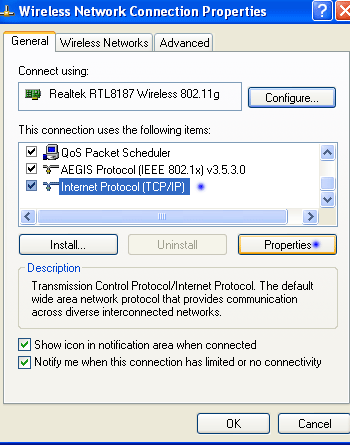
  • Setelah lakukan cara pertama lalu masuk ke control panel lalu pilih Network Connections
  • Klik jaringan yang anda pakai (LAN/Wifi), disini saya menggunakan Wifi jadi pilih wireless network (Sesuaikan dengan koneksi network yang anda pakai)
  • (Lihar Gambar diatas) klik properties.
  • Lalu akan muncul tampilan seperti di bawah ini, klik internet protocol lalu klik properties
  • Akan tampak seperti gambar berikut
  • Pilih Use the following DNS server addresses dan isikan seperti gambar diatas.
  • Masukkan preferred DNS server: 8.8.8.8
  • Masukkan Alternate DNS server :8.8.4.4
  • lalu klik ok
  • close semua, repair network anda.
DNS diatas memanfaatkan DNS Google. Selain meningkatkan koneksi speedy anda saat browsing cara ini terbukti ampuh untuk menangani ketidak suport'an beberapa server hosting dengan IP Speedy kita. Terkadang disaat browsing di blog luar dengan server US - Kanada. Speedy tidak compatible (Di beberapa server hosting tertentu) Namun dengan cara ini speedy dengan DNS google luamayan menanggulangi nya :) semoga bermanfaat dan rasakan kecepatan internet speedy sebelum dan sesudah. ;)


lintasberita

Monday, January 18, 2010

Be Carefull with W32/VBTroj.CEPA

W32/VBTroj.CEPA 18 Januari 2010

Kalau McGyver membuat virus


Masih ingat film McGyver yang dibintangi oleh Richard Dean Sanderson ? Di tangan McGyver, barang apapun yang ada di dekatnya bisa dijadikan sebagai alat atau senjata yang ampuh. Dengan bantuan Victorinox dan kreativitasnya, ia bisa meracik bahan-bahan yang biasa ada di rumah menjadi senjata mematikan seperti pelontar api sampai merakit bom. Rupanya hal yang sama terjadi pada dunia maya dimana hanya dengan bahasa pemrograman yang dipandang sebelah mata (VB Script) oleh para programmer diciptakan satu virus yang secara de Facto hari ini menjadi virus yang paling ganas dan paling banyak mengganggu di awal tahun 2010. Siapakah dia ? Tidak lain dan tidak bukan adalah Messenger yang di deteksi secara generik dengan nama W32/VBTroj.CEPA. Virus ini mampu melakukan banyak sekali hal seperti menginstal rootkit, memblok akses jaringan dan memanipulasi file hosts Windows supaya bisa melakukan pemblokiran akses ke situs-situs sekuriti pada komputer korbannya. Dan canggihnya lagi, file hosts tersebut di enkrip untuk menghindari deteksi dan perbaikan oleh program antivirus.


Baru-baru ini telah muncul satu virus lain ikut merampaikan acara tutup tahun ini, walaupun virus ini dibuat dengan program bahasa Visual Basic tetapi efek yang dihasilkan cukup merepotkan, ia akan melakukan blok terhadap "hampir" semua tools security termasuk antivirus yang umum sering digunakan oleh user dengan cara membaca "nama file" dari aplikasi tersebut.

Virus ini juga akan melakukan blok akses ke beberapa situs sekuriti atau situs lain yang telah ditentukan dengan cara mengalihkan ke nomor ip 209.85.225.99 yang merupakan ip publik www.google.com (lihat gambar 1), hal ini secara tidak langsung sebenarnya menyebabkan Ddos terhadap situs Google.com. Apakah ada hubungan atau tidak dengan serangan terhadap Google di China yang mengakibatkan Google mempertimbangkan untuk hengkang .... kita lihat saja. Yang jelas, makin banyak komputer yang terinfeksi oleh virus ini, maka akses (yang secara tidak langsung menyebabkan Ddos) terhadap situs awal Google akan makin tinggi.

Sehingga setiap kali user mencoba untuk akses ke website tertentu termasuk website security / antivirus, maka yang muncul adalah situs www.google.com. Untuk melakukan hal ini ia akan menambahkan alamat website yang akan di blok ke sebuah file HOSTS yang berada di direktori [C:\Windows\ System32\ Drivers\etc]


Gambar 1, Alamat website yang dialihkan oleh virus

Virus ini menyebar sangat cepat dengan memanfaatkan media chatting yang umum digunakan oleh user seperti Yahoo Messenger, MSN Messenger dan Skype dengan cara mengirimkan sebuah pesan dan melampirkan link untuk download sebuah file yang direkayasa seolah-olah file gambar (JPG) tetapi sebenarnya merupakan file virus yang sudah dikompres dengan nama file [%file%.JPG. ZIP] dengan ukuran yang berdeda-beda tegantung pada varian yang menginfeksi komputer tersebut, file yang dikompres tersebut mempunyai ekstensi EXE. Jika menerima pesan tersebut sebaiknya jangan anda terima apalagi menjalankan file yang disertakan walaupun dari kontak Messenger teman yang anda kenal, memang bukan teman anda yang mengirimkan virus tetapi virus yang menginfeksi komputernya dan memanfaatkan rekening Messengernya. (lihat gambar 2)


Gambar 2, Contoh pesan yang dikirimkan oleh virus

Salah satu hal yang menyebabkan virus ini sukses menyebar selain menggunakan media yang disebutkan di atas, ia juga akan melakukan update untuk memperbaharui dirinya hal inilah yang menyebabkan scaner antivirus tidak dapat mendeteksi virus tersebut. Virus ini semakin kuat bercokol dengan bantuan sebuah file rootkit yang bertugas untuk melindungi file induk yang aktif di memori, sehingga pembersihan yang dilakukan melalui windows Normal, Safe Mode atau safe Mode With Command Prompt terkadang tidak dapat menyelesaikan masalah, bagaimana mengatasi hal ini ? Silahkan simak pada bagian terakhir artikel ini.

Seperti yang sudah di jelaskan di atas bahwa virus ini dibuat dengan menggunakan bahasa Visual Basic, untuk file induk virus ini mempunyai ukuran yang bervariasi tergantung dari varian yang menginfeksi komputer target, biasanya akan mempunyai ukuran di atas 200 KB, sedangkan file pendukung lainnya mempunyai ukuran yang berbeda-beda yang akan di simpan didirektori yang berbeda-beda. (lihat gambar 3)


Gambar 3, File induk virus

Virus ini akan menggunakan icon Project Visual Basic dan untuk beberapa kasus akan menggunakan icon MSN Messanger untuk mengelabui user.


Bagaimana mengenali virus ini?

§ Akan menampilkan website www.google.com pada saat user mengakses web security / web antivirus, untuk beberapa varian tidak akan menampilkan website di atas.

§ Disable CMD dengan cara menutup aplikasi ini secara otomatis saat dijalankan.

§ Untuk beberapa varian, komputer yang terinfeksi akan dapat mengakses komputer lain dalam jaringan. Tetapi sebaliknya, komputer tersebut tidak akan dapat diakses oleh komputer lain dalam jaringan. Salah satu kemungkinan aksi ini dilakukan adalah untuk mempersulit pembersihan dan sekaligus mencegah infeksi ulang pada komptuer yang sudah terinfeksi.

§ Terdapat perubahan pada file [C:\Windows\ system32\ drivers\etc\ hosts], dengan menambahkan daftar alamat website yang akan di blok dengan format penulisan ip 209.85.225.99 yang di ikuti alamat website, untuk beberapa kasus virus ini akan mengenkripsi file hosts tersebut sehingga user tidak dapat mengetahui isi script yang di ubah, dengan bantuan tools maka anda dapat melihat dengan jelas isi dari file hosts tersebut. (lihat gambar 4 dan 5)


Gambar 4, Isi file hosts yang di ubah oleh virus


Gambar 5, Dengan bantuan HijackThis dapat melihat isi file hosts yang diubah dan dienkripsi oleh virus

Norman Security Suite mendeteksi virus ini sebagai W32/VBTroj.CEPA (lihat gambar 6)


Gambar 6, Norman Security Suite mendeteksi virus Messenger sebagai W32/VBTroj.CEPA

File induk Virus

Pada saat virus ini di aktifkan, ia akan membuat beberapa file induk yang akan di simpan dibeberapa lokasi yang berbeda-beda yang akan di aktifkan setiap kali komputer dinyalakan. Selain itu virus ini juga akan menyamarkan dirinya sebagai sebuah service Windows dan sebuah drivers yang berfungsi sebagai rootkit yang salah satu tugasnya akan melindungi proses virus yang aktif dimemori sehingga mempersulit dalam proses pembersihan dengan nama file yang berbeda-beda.


Berikut beberapa file yang akan dibuat oleh virus:

* C:\windows\System32

ü Wmi%xxx.exe, dimana xxx menunjukan karater acak (contohnya: wmispqd.exe, wmisrwt.exe, wmistpl.exe, atu wmisfpj.exe) dengan ukuran file yang berbeda-beda tergantung varian yang menginfeksi computer target.

ü %xxx%.exe@, dimana %xxx% menunjukan karakter acak (contoh: qxzv85.exe@) dengan ukuran yang berbeda-beda tergantung varian yang menginfeksi.

ü secupdat.dat

* C:\Documents and Settings\%user% \%xx%.exe, dimana xx adalah karakter acak (contoh: rllx.exe) dengan ukuran file sekitar 6 kb atau 16 kb (tergantung varian yang menginfeksi) . File ini akan disembunyikan oleh virus guna mempersulit dalam penghapusan.
* C:\Windows\System32 \drivers

ü Kernelx86.sys

ü %xx%.sys, dimana xx ini adalah karakter acak yang mempunyai ukuran sekitar 40 KB (contoh: mojbtjlt.sys atau cvxqvksf.sys)

ü Ndisvvan.sys

ü krndrv32.sys

* C:\Documents and Settings\%user% \secupdat. dat
* C:\Windows\INF

ü netsf.inf

ü netsf_m.inf


Autorun

Agar file tersebut dapat di jalankan secara otomatis, ia akan membuat string pada registri dengan memanipulasi file windows dengan nama ctfmon.exe, Sebenarnya trik ini digunakan agar user tidak curiga, tapi jika dilusuri lebih jauh ini adalah langkah yang brilian karena file ini justru mempunyai peranan yang sangat penting agar dirinya dapat aktif secara otomatis dengan menjalankan file virus yang sudah ditentukan. Selain itu ia juga akan aktif setiap kali user menjalankan file "explorer.exe" atau membuka aplikasi "Windows Explorer"


Ø HKEY_LOCAL_MACHINE\ software\ microsoft\ windows\currentv ersion\run

· ctfmon.exe

Ø HKEY_LOCAL_MACHINE\ SOFTWARE\ Microsoft\ Windows NT\CurrentVersion\ Image File Execution Options\ctfmon. exe

· Debugger = %file_induk_ virus%.exe (contoh : wmistpl.exe)

Ø HKEY_LOCAL_MACHINE\ software\ microsoft\ windows nt\currentversion\ winlogon

· shell = explorer.exe "C:\Documents and Settings\%user% \%xx%.exe"

Catatan: %xx%, adalah karakter acak, contoh: rllx.exe

Ø HKEY_LOCAL_MACHINE\ system\ControlSe t001\services

· %xx% menunjukan file acak

o Image path = System32\drivers\ %xx%.sys (contoh: jdwjlyju.sys)

Ø HKEY_LOCAL_MACHINE\ system\CurrentCo ntrolSet\ services

· %xx% menunjukan file acak

o Image path = System32\drivers\ %xx%.sys (contoh: jdwjlyju.sys)


Blok fungsi Windows

Untuk memperlancar aksi nya ia akan blok beberapa fungsi windows termasuk disable System Restore, disable Windows Firewall, disable RPC DCOM, disable upgrade Service Pack 2 dan tidak bisa menampilkan file yang tersembunyi dengan merubah string pada registry berikut:


Ø HKEY_LOCAL_MACHINE\ software\ microsoft\ ole

· EnableDCOM = N


Ø HKEY_LOCAL_MACHINE\ software\ microsoft\ security center

· AntiVirusDisableNot ify = 1

· FirewallDisableNoti fy = 1

· AntiVirusOverride = 1

· FirewallOverride = 1


Ø HKEY_LOCAL_MACHINE\ SOFTWARE\ Policies\ Microsoft\ Windows NT\SystemRestore

· DisableConfig = 1


Ø HKEY_LOCAL_MACHINE\ software\ policies\ microsoft\ windows\windowsu pdate

· DoNotAllowXPSP2 = 1


Ø HKEY_LOCAL_MACHINE\ SOFTWARE\ Microsoft\ Windows\CurrentV ersion\Explorer\ Advanced\ Folder\SuperHidd en

· DefaultValue = 0

· CheckedValue = 1


Ø HKEY_LOCAL_MACHINE\ system\ControlSe t001\control\ lsa

· restrictanonymous = 1


Ø HKEY_LOCAL_MACHINE\ system\CurrentCo ntrolSet\ control\lsa

· restrictanonymous = 1


Ia juga akan merubah registry berikut:


Ø HKEY_LOCAL_MACHINE\ SOFTWARE\ Microsoft\ Windows NT\CurrentVersion\ Winlogon

· userinit = C:\WINDOWS\system32 \Userinit. exe, ,C:\Documents and Settings\%user% \%files_virus% .exe \s (%file_virus, menunjukan nama file yang berbeda-beda tergantung varian yang menginfeksi, ontohnya: fnhh.exe).


Agar file virus tersebut dapat aktif secara bebas di computer target, ia juga akan mendaftarkan file induk virus tersebut dan rule windows firewall berikut :


Ø HKEY_LOCAL_MACHINE\ SYSTEM\ControlSe t002\Services\ SharedAccess\ Parameters\ FirewallPolicy\ DomainProfile\ AuthorizedApplic ations\List

· C:\windows\system32 \%file_induk_ virus%.exe (contoh: wmistpl.exe) = C:\windows\system32 \%file_induk_ virus%.exe (contoh: wmistpl.exe) :*:Enabled:UPnP Firewall


Ø HKEY_LOCAL_MACHINE\ SYSTEM\ControlSe t002\Services\ SharedAccess\ Parameters\ FirewallPolicy\ StandardProfile\ AuthorizedApplic ations\List

· C:\windows\system32 \ file_induk_virus% .exe (contoh: wmistpl.exe) = C:\windows\system32 \%file_induk_ virus%.exe (contoh: wmistpl.exe) :*:Enabled:UPnP Firewall


Selain dengan membuat string registry tersebut, ia juga akan blok "hampir" semua tools sekuriti yang umum digunakan dengan cara membaca nama file dari aplikasi tersebut.


Blok akses Internet

Sebagai oleh-oleh ia akan mencoba untuk blok akses ke website security termasuk antivirus, dengan cara menampilkan website www.google.com (untuk beberapa varian tertentu untuk blok akses web sekuriti tidak akan menampilkan web www.google.com).


Untuk melakukan hal ini ia akan merubah isi file Hosts Windows yang berada di direktori [C:\Windows\ System32\ Drivers\Etc\ Hosts] dengan cara menambahkan nomor ip publik www.google.com di ikuti dengan alamat website yang akan diblok dan untuk beberapa kasus virus ini akan mengenkripsi file tersebut sehingga user tidak dapat mengetahui isi dari tersebut. (lihat gambar 7dan 8)


Gambar 7, Isi hosts file windows yang telah di enkripsi


Gambar 8, Isi hosts file windows yang telah diubah oleh virus setelah di dekrip

Update layaknya antivirus

Virus ini dapat melakukan update layaknya program antivirus dengan mendownload beberapa file dari website yang telah ditentukan, file ini biasanya akan di simpan didirektori [C:\Windows\ System32] dengan format file %xxx%.exe@, dimana %xxx% merupakan nama file dan ukuran yang berbeda-beda (contoh: qxzv85.exe@)


Blok akses "Safe Mode" dan "Safe Mode with command prompt"

Untuk beberapa kasus virus ini juga akan berupaya untuk menghapus key "safeboot" sehingga komputer tidak dapat booting ke mode "safe mode" dan "safe mode with command prompt". Untuk melakukan hal ini ia akan menghapus string berikut:


Ø HKEY_LOCAL_MACHINE\ SYSTEM\ControlSe t001\Control\ SafeBoot

Ø HKEY_LOCAL_MACHINE\ SYSTEM\ControlSe t002\Control\ SafeBoot

Ø HKEY_LOCAL_MACHINE\ SYSTEM\CurrentCo ntrolSet\ Control\SafeBoot


Media Penyebaran

Untuk menyebarkan dirinya ia akan memanfaatkan media chatting yang umum digunakan oleh user seperti Yahoo Messenger, Gtalk, Skype dan MSN Messenger dengan mengirimkan sebuah pesan kesemua alamat ID yang ada di komputer target dengan menyertakan link untuk mendownload sebuahlampiran yang sudah dikompresi dengan ukuran yang bervariasi sesuai dengan varian yang menginfeksi, file tersebut mempunyai nama file [%file%.JPG. ZIP], file yang dikompres tersebut mempunyai ekstensi EXE. Jika menerima pesan tersebut sebaiknya jangan anda terima apalagi menjalankan file yang disertakan kecuali anda mau terinfeksi virus ini.

Pesan yang akan disampaikan mempunyai isi yang berbeda-beda, sedangkan untuk link yang di sertakan salah satunya mengarah kesebuah alamat 208.77.45.10. (lihat gambar 9 dan 10)


Gambar 9, Pesan yang dikirimkan oleh virus


Gambar 10, Salah satu domain tempat untuk download file virus

Cara membersihkan Virus YM


1. Putuskan komputer yang akan di bersihkan dari jaringan maupun internet

2. Ubah nama file [C:\Windws\system32 \msvbvm60. dll] menjadi [xmsvbvm60.dll] untuk mencegah virus aktif kembali selama proses pembersihan.

3. Sebaiknya lakukan pembersihan dengan menggunakan Tools Windows Mini PE Live CD hal ini disebabkan untuk beberapa file induk dan file rootkit yang menyamar sebagai services dan drivers sulit untuk di hapus terlebih file ini akan disembunyikan oleh virus. Silahkan download software tersebut di alamat http://soft- rapidshare. com/2009/ 11/10/minipe- xt-v2k50903. html


Kemudian booting komputer dengan menggunakan software Mini PE Live CD tersebut. Setelah itu hapus beberapa file iduk virus dengan cara : (lihat gambar 11)


· Klik menu [Mini PE2XT]

· Klik menu [Programs]

· Klik menu [File Management]

· Klik menu [Windows Explorer]

· Kemudian hapus file berikut:


ü C:\Windows\System32

§ Wmi%xxx.exe, dimana xxx menunjukan karater acak (contohnya: wmispqd.exe, wmisrwt.exe, wmistpl.exe, atu wmisfpj.exe) dengan ukuran file yang berbeda-beda tergantung varian yang menginfeksi computer target.

§ %xxx%.exe@, dimana %xxx% menunjukan karakter acak (contoh: qxzv85.exe@) dengan ukuran yang berbeda-beda tergantung varian yang menginfeksi.

§ secupdat.dat


ü C:\Documents and Settings\%user% \%xx%.exe, dimana xx adalah karakter acak (contoh: rllx.exe) dengan ukuran file sekitar 6 kb atau 16 kb (tergantung varian yang menginfeksi) .


ü C:\Windows\System32 \drivers

§ Kernelx86.sys

§ %xx%.sys, dimana xx ini adalah karakter acak yang mempunyai ukuran sekitar 40 KB (contoh: mojbtjlt.sys atau cvxqvksf.sys)

§ Ndisvvan.sys

§ krndrv32.sys


ü C:\Documents and Settings\%user% \secupdat. dat


ü C:\Windows\INF

§ netsf.inf

§ netsf_m.inf


Gambar 11, Gunakan Windows Mini PE untuk menghapus file virus

4. Hapus registry yang dubah dibuat oleh virus, dengan menggunakan "Avas! Registry Editor", caranya : (lihat gambar 12)

· Klik menu [Mini PE2XT]

· Klik menu [Programs]

· Klik menu [Registry Tools]

· Klik [Avast! Registry Editor]

· Jika muncul layar konfirmasi kelik tombol "Load....."

· Kemudain hapus registry:


ü LOCAL_MACHINE_ SOFTWARE\ microsoft\ windows\currentv erson\run\ \ctfmon.exe

ü LOCAL_MACHINE_ SYSTEM\ControlSe t001\services\ \kernelx86

ü LOCAL_MACHINE_ SYSTEM\CurrentCo ntrolSet\ services\ \kernelx86

ü LOCAL_MACHINE_ SYSTEM\CurrentCo ntrolSet\ services\ \passthru

ü LOCAL_MACHINE_ SOFTWARE\ Microsoft\ Windows NT\CurrentVersion\ Image File Execution Options\\ctfmon.exe

ü LOCAL_MACHINE_ SOFTWARE\ microsoft\ windows nt\currentversion\ winlogon

§ Ubah value pada string Userinit menjadi = userinit.exe,

ü LOCAL_MACHINE_ SOFTWARE\ microsoft\ windows nt\currentversion\ winlogon

§ Ubah value pada string Shell menjadi = Explorer.exe

ü LOCAL_MACHINE_ SYSTEM\ControlSe t001\services\ \%xx%

ü LOCAL_MACHINE_ SYSTEM\CurrentCo ntrolSet\ services\ \%xx%

ü LOCAL_MACHINE_ SYSTEM\ControlSe t002\Services\ SharedAccess\ Parameters\ FirewallPolicy\ DomainProfile\ AuthorizedApplic ations\List\ \C:\windows\ system32\ %file_induk_ virus%.exe (contoh: wmistpl.exe)

ü LOCAL_MACHINE_ SYSTEM\ControlSe t002\Services\ SharedAccess\ Parameters\ FirewallPolicy\ StandardProfile\ AuthorizedApplic ations\List\ \C:\windows\ system32\ %file_induk_ virus%.exe (contoh: wmistpl.exe)


Catatan:

%xx% menunjukan karakter acak, key ini dibuat untuk menjalankan file .SYS yang mempunyai ukuran sebesar 40 KB yang berada di direktori [C:\Windows\ system32\ drivers\]


Gambar 12, Menghapus registry yang diubah oleh virus

5. Restart komputer, pulihkan sisa registry yang diubah oleh virus dengan copy script berikut pada program notepad kemudian simpan dengan nama repair.inf. Jalankan file tersebut dengan cara: klik kanan repair.inf | klik install


[Version]

Signature="$ Chicago$"

Provider=Vaksincom Oyee


[DefaultInstall]

AddReg=UnhookRegKey

DelReg=del


[UnhookRegKey]

HKLM, Software\CLASSES\ batfile\shell\ open\command, ,,"""%1"" %*"

HKLM, Software\CLASSES\ comfile\shell\ open\command, ,,"""%1"" %*"

HKLM, Software\CLASSES\ exefile\shell\ open\command, ,,"""%1"" %*"

HKLM, Software\CLASSES\ piffile\shell\ open\command, ,,"""%1"" %*"

HKLM, Software\CLASSES\ regfile\shell\ open\command, ,,"regedit. exe "%1""

HKLM, Software\CLASSES\ scrfile\shell\ open\command, ,,"""%1"" %*"

HKLM, SOFTWARE\Microsoft\ Windows NT\CurrentVersion\ Winlogon, Shell,0, "Explorer.exe"

HKLM, software\microsoft\ ole, EnableDCOM,0, "Y"

HKLM, SOFTWARE\Microsoft\ Security Center,AntiVirusDis ableNotify, 0x00010001, 0

HKLM, SOFTWARE\Microsoft\ Security Center,FirewallDisa bleNotify, 0x00010001, 0

HKLM, SOFTWARE\Microsoft\ Security Center,AntiVirusOve rride,0x00010001 ,0

HKLM, SOFTWARE\Microsoft\ Security Center,FirewallOver ride,0x00010001, 0

HKLM, SYSTEM\ControlSet00 1\Control\ Lsa, restrictanonymous, 0x00010001,0

HKLM, SYSTEM\ControlSet00 2\Control\ Lsa, restrictanonymous, 0x00010001,0

HKLM, SYSTEM\CurrentContr olSet\Control\ Lsa, restrictanonymous, 0x00010001,0

HKLM, SOFTWARE\Microsoft\ Windows\CurrentV ersion\Explorer\ Advanced\ Folder\SuperHidd en, CheckedValue, 0x00010001, 0

SOFTWARE\Microsoft\ Windows\CurrentV ersion\Explorer\ Advanced\ Folder\SuperHidd en, DefaultValue, 0x00010001, 0

SOFTWARE\Microsoft\ Windows\CurrentV ersion\Explorer\ Advanced\ Folder\SuperHidd en, UncheckedValue, 0x00010001, 1


[ del ]

HKCU, Software\Microsoft\ Windows\CurrentV ersion\Policies\ System,DisableRe gistryTools

HKCU, Software\Microsoft\ Windows\CurrentV ersion\Policies\ System,DisableCM D

HKCU, Software\Microsoft\ Windows\CurrentV ersion\Policies\ Explorer, NoFolderOptions

HKLM, SOFTWARE\Microsoft\ Windows\CurrentV ersion\Run, ctfmon.exe

HKLM, SYSTEM\ControlSet00 1\Services\ kernelx86

HKLM, SYSTEM\ControlSet00 2\Services\ kernelx86

HKLM, SYSTEM\CurrentContr olSet\Services\ kernelx86

HKLM, SYSTEM\CurrentContr olSet\Services\ mojbtjlt

HKLM, SYSTEM\ControlSet00 1\Services\ mojbtjlt

HKLM, SYSTEM\ControlSet00 2\Services\ mojbtjlt

HKLM, SYSTEM\ControlSet00 1\Services\ Passthru

HKLM, SOFTWARE\Policies\ Microsoft\ Windows NT\SystemRestore

HKLM, SOFTWARE\Policies\ Microsoft\ Windows\WindowsU pdate, DoNotAllowXPSP2

HKLM, SOFTWARE\Policies\ Microsoft\ Windows\WindowsU pdate

HKLM, SOFTWARE\Microsoft\ Windows NT\CurrentVersion\ Image File Execution Options\ctfmon. exe


6. Fix registry Windows untuk mengembalikan agar komputer dapat booting "safe mode with command prompt" dengan download file FixSafeBoot. reg (Windows XP) di alamat berikut kemudian jalankan file tersebut dengan cara :


o Klik menu [Start]

o Klik [Run]

o Ketik REGEDIT.EXE kemudian klik tombol [OK]

o Pada layar "Registry Editor", klik menu [File | Import]

o Tentukan file .REG yang baru anda buat

o Klik tombol [Open]


7. Hapus file temporary dan temporary internet file. Silahkan gunakan tools ATF-Cleaner. Download tools tersebut di alamat http://www.atribune .org/public- beta/ATF- Cleaner.exe


8. Restore kembali host file Windows yang telah di ubah oleh virus. Anda dapat menggunakan tools Hoster, silahkan download di alamat berikut http://www.softpedi a.com/progDownlo ad/Hoster- Download- 27041.html (lihat gambar 13)


Gambar 13, Restore Host File Windows dengan menggunakan HosterExpert

Klik tombol [Restore MS Host File], untuk merestore file hosts Windows tersebut.


9. Untuk pembersihan optimal dan mencegah infeksi ulang, scan dengan antivirus yang up-to-date dan sudah dapat mendeteksi virus ini. Anda juga dapat menggunakan Norman Malware Cleaner, silahkan download di alamat berikut http://www.norman. com/support/ support_tools/ 58732/en (lihat gambar 14)


Gambar 14, Hasil deteksi Norman Security Suite

Salam,

Aj Tau

info@vaksin. com


PT. Vaksincom

Jl. Tanah Abang III / 19E

Jakarta 10160


Ph : 021 3456850
Fx : 021 3456851 lintasberita

Tuesday, December 29, 2009

What is WIMAX ?

What Is WiMax?

WiMAX is a wireless digital communications system, also known as IEEE 802.16, that is intended for wireless "metropolitan area networks". WiMAX can provide broadband wireless access (BWA) up to 30 miles (50 km) for fixed stations, and 3 - 10 miles (5 - 15 km) for mobile stations. In contrast, the WiFi/802.11 wireless local area network standard is limited in most cases to only 100 - 300 feet (30 - 100m).

With WiMAX, WiFi-like data rates are easily supported, but the issue of interference is lessened. WiMAX operates on both licensed and non-licensed frequencies, providing a regulated environment and viable economic model for wireless carriers.

WiMAX can be used for wireless networking in much the same way as the more common WiFi protocol. WiMAX is a second-generation protocol that allows for more efficient bandwidth use, interference avoidance, and is intended to allow higher data rates over longer distances.

The IEEE 802.16 standard defines the technical features of the communications protocol. The WiMAX Forum offers a means of testing manufacturer's equipment for compatibility, as well as an industry group dedicated to fostering the development and commercialization of the technology.

WiMax.com provides a focal point for consumers, service providers, manufacturers, analysts, and researchers who are interested in WiMAX technology, services, and products. Soon, WiMAX will be a very well recognized term to describe wireless Internet access throughout the world. lintasberita

Intel WIMAX/WIFI

Intel® WiMAX/WiFi Link 5350 and Intel® WiMAX/WiFi Link 5150


The Intel® WiMAX/WiFi Link 5350 and Intel® WiMAX/WiFi Link 5150 are the family of IEEE 802.16e and 802.11a/b/g/n wireless network adapter that operates in the 2.5GHz spectrum for WiMAX and 2.4GHz and 5.0GHz spectra for WiFi. This adapter delivers up to 13Mbps¹ downlink and 3Mbps¹ uplink over WiMAX and up to 450Mbps Tx/Rx² over WiFi. This integrated module embedded in new Intel® Centrino® 2 processor technology notebooks provides flexible and convenient connectivity to both WiFi and WiMAX networks to enhance today's mobile lifestyle.
Product information

Get ready for the mobile revolution with WiMAX. WiMAX delivers rich broadband connectivity over a wide area to allow you to work, play, and stay connected in more places.

*
Learn more
http://download.intel.com/network/connectivity/products/wireless/318987.pdf
File type/Size: PDF 1.40MB
*
Download Intel® WiMAX/WiFi Link 5350 Product Brief
http://download.intel.com/network/connectivity/products/wireless/320663.pdf
File type/Size: PDF 553KB
*
Download Intel® WiMAX/WiFi Link 5150 Product Brief
http://download.intel.com/network/connectivity/products/wireless/320663_5150.pdf
File type/Size: PDF 703KB
*
Mobilize Your Internet Overview
http://download.intel.com/network/connectivity/products/wireless/mobilize-your-internet.pdf
File type/Size: PDF 1.22MB

Features and benefits
WiMAX - Broadband Internet on the go
IEEE 802.16e-2005 Wave 2 compliant. Mobile WiMAX release 1 Wave 2 system profile ready

* Broadband connectivity for rich Internet experience while on the go with open standards based WiMAX networks

Over-the-air provisioning, management and upgrade support

* Activate and stay connected on broadband with minimal effort

Secure broadband connectivity

* Peace of mind with secure access to critical information and applications when you need it

USB power optimization

* Stay connected longer

Quality of Service and Optimized Handover Support

* Enjoy better voice quality while on the move

Intel® PROSet Wireless WiMAX Connection Utility v1.0

* Scan for and securely connect to WiMAX networks

Wi-Fi Performance
Intel® WiMAX/WiFi Link 5350

* Enjoy fast file transfers and step up your productivity with Up to 450 Mbps of Bandwidth²
* Business and Home users can effortlessly tackle today's voice, video, and data applications and be prepared for multimedia applications of the future
* Wirelessly backup your entire system to a Server
* Stream High Definition (HD) video throughout the Home with Bandwidth to spare for other applications

Intel® WiMAX/WiFi Link 5150

* Up to 300 Mbps of Receive Bandwidth° results in a 5x Bandwidth increase° compared to legacy 802.11a/b/g solutions

Multiple Input Multiple Output (MIMO) technology

* Provides higher data rates compared to 802.11a/b/g solutions through the use of multiple antennas to transmit and receive data
* Helps ensure more consistent coverage throughout the enterprise and home resulting in a more enjoyable user experience

Up to 2x greater range¹

* Enable better wireless reception for greater bandwidth at farther distances
* Reduce the number of "dead zones", dropped data packets, and network re-connects, helping to dramatically improve connectivity throughout the home

Industry-leading power consumptionΦ

* Reduced WLAN power consumption results in longer platform battery life for greater utility, enjoyment, and convenience

Dual-band, quad-mode solution (802.11a/b/g/n)

* Operates in the 2.4 GHz and 5.0 GHz band resulting in maximum compatibility with today's installed base of legacy 802.11a/b/g networks in the enterprise and in the home
* Connect with confidence to the Internet via the millions of Wi-Fi hotspots around the world

Wireless support for Intel® Active Management Technology§

* Provides IT managers the capability to remotely discover, heal, and protect laptops regardless of the functional state of the operating system
* Manage and troubleshoot laptops even in a standby or hibernate state resulting in reduced on-site support cost

Intel® PROSet/Wireless Software± v.12.0

* Feature-rich and easy to use application that supports legacy and 802.11a/b/g/n features on Microsoft Windows XP* and Microsoft Windows Vista*
* Simplifies client deployments and enables remote management of wireless settings and profiles

Advanced security via 802.11iΦ

* Increased security via support of the Advanced Encryption StandardΦ (AES) block cipher technology ensures that enterprise and home networks are protected from unauthorized access and intrusion

PCI, CISP

* Retail (Credit Card Processing)

FIPS, FISMA

* Government standards: Federal Information Processing Standard and Federal Information Security Management Act

Interoperability
Connect with Intel® Centrino® processor technology program

* Maximum compatibility is ensured when using a laptop based on Intel® Centrino® processor technology and 3rd party access points (sometimes known as wireless routers) that have the Connect with Intel® Centrino® processor technology validated to provide optimum performance for today's mobile lifestyle

Cisco Compatible Extensions* v.4

* Helps prevent delays in VoIP calls when roaming between access points
* Enables improved network diagnostics to aid in IT management and troubleshooting lintasberita

Wednesday, July 1, 2009

All you Need to Know About Laptop Batteries

All you Need to Know About Laptop Batteries

Laptop batteries allow you to work on your computer even while you're on the go. Whenever you need to access information from your computer, a battery will grant you the ability to be efficient in whatever you do. However, a battery can only do so much. A lot of people find that their battery lives shorten as time goes by eventually causing their notebooks to run slower than usual.

While a laptop battery's deterioration is inevitable, there are many ways by which you can help prolong the life of your battery. Understanding how it works and what can make your battery "age" faster is one of them. The technicalities surrounding a laptop battery do not really take rocket science smarts to understand.

Lithium ion

If you have a later model laptop, you'll probably find your battery is a Lithium ion or LiON. This is a type of battery that is common to newer notebooks because it's relatively lighter than its predecessors. It's also much more efficient and production costs are minimal which is why manufacturers have managed to introduce this to the market.

For those who are searching for a replacement battery, you're better off with LiON. Not only is it more environment-friendly, it is also has a longer runtime.

Memory effect

You may encounter this term on older types of laptop batteries such as the nickel cadmium and nickel metal hybrid. The memory effect basically causes a battery to hold less charge. Lesser charge means lesser energy. For your laptop, that means lesser runtime. It usually happens when you tend to leave your battery plugged onto the charger long after it has been fully charged. Conversely, it also caused by undercharging and charging before the battery is fully drained.

Shallow cycling

Shallow cycling is when you charge your laptop battery without allowing it to reach full charge status. While there are instances when this cannot be avoided, it's always best to allow for ample time for your battery to charge up before disconnecting it from the charger. Shallow cycling leads to the rapid deterioration of your battery's ability to hold charges. It is one of the primary causes of memory effect which was discussed above.

Cycle life

Laptop batteries have a finite lifespan. Over time, their efficiency and storage capacity are diminished which can affect your unit's overall performance. Cycle life refers to the number of charge and discharge cycles before your battery starts to deteriorate. On the average, rechargeable batteries can go from 500 to 1200 cycles before their nominal capacity goes below 80% of its initial capacity. lintasberita

The Secret to Battery Computer Notebook

The Secret to Battery Computer Notebook

Here are a few basics of what this broad subject has to offer up to any individual who wants to know more about it.

When most people think of battery computer notebook, what comes to psyche is regularly basic information that's not particularly interesting or beneficial. But there's a lot more to battery computer notebook than just the basics.

The little notebook computer or processor is tailor made for business. It's the improve communication tool. It's the improve record care tool. It's the improve presentation tool. And if that wasn't enough, all of the above is neatly packaged into a small portable automaton that can be full anywhere and everywhere.

For any range business, small to method to jumbo, the notebook computer is steadily becoming an vital tool for business.

In the introduction, we saw how this subject can be beneficial to anyone. We will continue by explaining the basics of this topic.

Savvy commerce people know acquiring the right tools is an important feature in determining the triumph or profitability of any company. Therefore, along with the recurrent outfitting of your crowd or commerce - total consideration should be given to choosing your notebook computers.

Business owners should be awake that notebook technology is varying at a blistering pace. Every two living or so, there is a entire new generation of notebooks and notebook technology to consider. Notebooks are receiving smaller, faster, and better connected. They are also offering performance that is matching or almost matching their desktop rivals.

Major reasons why, for the first time in history, notebook computers are outselling their bigger cousins, desktop computers. topic buying, no doubt, drama a significant part in all those sales. Large corporate organizations are export notebooks for their companies, sales people and employees. It makes for a more competitive group in a very competitive world.

But how do you prize a good dealings notebook computer? What's the criteria for judging a good machine? What's the right mainframe or notebook for your circle or sales staff?

Here are some important factors any commerce should think when trade a notebook computer or processor for their company. broad factors that determine a good commerce notebook. think these...

Portability

Perhaps, the most significant feature and the focal reason you're trade a notebook computer is portability. You can take it anywhere. You can take your records, reports, presentations or food where ever they basic to be. For the commerce traveler or 'road warrior', the notebook computer is an central tool for their business.

When trade their notebook of choice, these 'road warriors' look at the portability of their notebook. mass and substance are very important. They want something that's light and small, yet pungent enough to do the job. They will maybe look in the Ultra-Portable and lean and Light classes of notebooks to make their choice.

Notebooks in those categories are regularly well under 5 pounds, around 10 by 14 inches in range and approximately an shuffle thick. Small enough to confuse in a suitcase or slip comfortably under your arm. They won't drain your energy even if you have to lug it around all day!

Battery Life

You also have to look for a notebook computer that will last long enough to get the job done. You want sufficient battery life for those long even trips. Fortunately, battery life is increasing, you can now get up to 5 or more hours on high trait notebooks. Buy the premier numbered cubicle battery, and buy any voluntary built-in battery extras that will improve battery life.

Is everything making sense so far? If not, I'm reliable that with just a little more reading, all the truth will decrease into place.

Connectivity

You want something that's calm to unite to the Internet so connectivity is another important factor. Being in devoted contact with all your employees can be a determining part in your choice of notebooks. Communication is vital. Most high class notebooks come with Wi-Fi (Wireless Fidelity) connections, many have a tri-mode 802.11a/b/g wireless system.

Some newer models, like the Sony's New Ultra-Portable VAIO VGN-T350P, are raising the bar, it has the world's first 'Built-in Cellular Modem'. You can use your sect call to join to the Internet. This may be a great advantage because finding a 'Hot Spot' in some parts of the world can still be difficult.

Performance

You requisite to judge the performance direct of your dealings computer. Can it sell all your company's demands, can it sell heavy graphics, charts, diagrams, spreadsheets, etc. restraint out the RAMâ€"senior RAM will be better for graphics and video. It's usually agreed that you requisite at slightest 256MB for Windows XP and Mac OS X. You will only requisite 128MB for other operating systems in Windows or Mac.

Most notebooks come with lots of storeroom space, 60-80 GIG hard drives are common. outside drives are also available if you basic extra space.

Other tasks may be important to your line of business. For example, if you basic to take notes in the field, i.e. genuine estate agents, engineers, doctors or checkup personnelâ€"then a schedule or a convertible capsule may be a better choice for your company.

Sturdiness

This is important if you want a notebook for a lot of highway work or trade traveling. Your notebook should be energetic or ruggerized to be able to take a good pounding. Many notebooks have some tale sturdiness skin such as IBM's Active Protection usage which is intended to picket the hard drive from falls and spills for those accident flat notebook users in your company.

Security

Living in today's world we basic safeguards and defense measures in place to shield your crowd records and files. Not to mention, to shield against the theft of your notebook computer itself. Along those same lines your notebook computer should have advanced defense features. Many notebooks such as the IBM/Sonoma ThinkPad series contain an integrated fingerprint scanner for biometric authentication that uses an Embedded safety Subsystem and Password Manager.

Image/Style

At first glance this may appear like a superficial exchange point, but not really. In today's problem world, likeness or fashion does consider and contribute to your button line. Sad but true! You want a notebook computer that matches the likeness of your company.

There is one to fit your needs, you have a full range of styles of notebooks to desire from, whether it be conservative black or glowing race car red. Most businesses are ultra-conservative (nature of the beast) and should prize a notebook along those conservative lines, other businesses may want to promote a sharper or cooler picture such as in fashion, creative arts, harmony industry...

Take time to think the points presented above. What you learn may help you overcome your hesitation to take action.

What you have learned while reading this informative article, is knowledge that you can keep with you for a lifetime. lintasberita

Lithium Batteries - Tips to Make Your Laptop Last Longer

Lithium Batteries - Tips to Make Your Laptop Last Longer

The basic makeup of each battery type is very similar. Each has a positive electrode (cathode), a negative electrode (anode), a separator and an electrolyte. However, the chemistry in each is different. The differences offer various levels of performance.

Much of our newest technologies demand much more power than its predecessors. The features and sophistication of the newer electronics have truly increased the power demanded from batteries. It is this power demand that motivated the industry to develop power sources to keep up.

A lithium is different from an alkaline.

Both the chemistry and construction of lithium and alkaline differ. It is the lithium design that helps this newer power source meet the high drains of many of today's devices.

These new and powerful batteries are used in various portable electronic devices, and are widely used as a mobile laptop computer power source.

Here are some tips to make your laptop power source last longer:

Heat Kills!

Heat truly decreases the life span of lithium batteries. You may notice that if you use your laptop as a replacement for a desktop, the battery capacity decreases greatly. Some measure the decrease at 60% to 80% of the original capacity after about a year.

If you use your laptop as a desktop, you should remove the battery while using the plug-in power source. And before storing your laptop battery, you may want to first check with the manufacture on the effects of moisture and dust in the casing.

Correct Storage

If you don't plan on using your lithium batteries for a while, you may want to put them in your refrigerator - not the freezer!

Ideally, you should store at a 40% charge level. At 100%, you may have unnecessary stress and internal corrosion. But if the charge is too low, the battery can eventually become unusable because it will self discharge.

Calibrating Helps

Most manufacturers agree that there is some benefit to completely discharging your lithium batteries periodically, especially for your laptop. If you completely drain the laptop cell, it will help to recalibrate which will allow for more accurate measure of the life span.

You should try this every 30 charges or when you notice readings are off.

Calibration does not extend the discharge time - it only resets it to show the remaining charge accurately.

Memory is not what it once was ...

When I got my first cell phone, I was told to let it completely die before recharging. This idea is that of memory. This process of completely discharging before recharging to the max, would supposedly give my phone the complete battery capacity.

If I recharged with 50% capacity already, the battery would assign the half way point as the empty point, and cut the capacity in half.

But this does not apply to lithium cells - only for nickel based. In truth, fully discharging your lithium battery often can be harmful to its battery's health, possibly making it completely unusable if levels go too low.

The modern lithium has a safety circuit to make sure it doesn't reach the point of no return. The safety circuit isn't guaranteed. If you leave it completely drained for a few days, the safety circuit probably won't save it. lintasberita

LAPTOP BUYING GUIDE

Laptop Buying Guide

Forward - The purpose of this article is to provide you with unbiased information for your laptop/notebook computer buying decisions. We've tried to make this guide easy to read and informative, however it also includes detailed technical information for the more advanced reader.

This guide is divided into several different chapters which include: what to consider before purchasing a laptop or notebook computer, recommended laptop features, an explanation of laptop video memory and how it effects screen resolution, a notebook CPU speed index guide, details on the mobile CPUs that are in the speed index, hints on buying a laptop, and a list of other laptop/notebook computer resources.

The right menu bar contains a list of the different chapters that you can use to jump to the chapters you are most interested in.

What to Consider Before Purchasing a Laptop Computer

1. Portability - The main reason to have a laptop or notebook computer is portability - the need to take your entire computer from one place to another. If you don't need portability, then you should probably buy a desktop. Or if you really need portability but don't want the weight and size of a laptop, a well equipped cell phone/pda might be a good choice. Laptops come in all diferent weights, sizes, and speeds.

2. Expense - Laptop computers cost almost twice as much as comparably equipped desktops. Shocking isn't it?
You can actually buy two comparably equipped desktops for the price of one laptop. So if you have to have a computer in two separate places, you would be better off with two desktops (if they were reasonably close together you could hook them together in a wired or wireless local area network (LAN).

3. Speed - Laptops are 30-100% slower than a desktop with the same features (CPU, RAM, hard drive capacity, etc.). Slower CPUs, motherboards, hard drives, and video systems all contribute to the speed loss.

4. Upgradeability - Laptop computers are mostly non-upgradeable. Whatever CPU, video card (built into the motherboard), sound card (also built-in), and screen, that come with the laptop are the same parts the laptop will end with.
While it is possible to upgrade main memory, hard drives, and sometimes CPUs, these upgrades can be expensive.

You can also upgrade newer laptops through their USB, USB 2.0, and Firewire ports. Only USB 2.0 and Firewire ports can run high speed devices e.g. hard drives and DVD drives. While much improvement has been made in the speed and price of external drives, upgrading a laptop this way adds weight and decreases portability.
(However, it is a very good idea to back up all your important files to a CD, DVD, external hard drive, web storage etc. at least once a week. - ed)

5. Serious Gaming. You will need to spend at least $2,000 - $2,500 for a laptop that can play current games at a respectable speed. I don't recommend laptops for serious gaming no matter how much you are willing to spend. Why?

Because if you love to play games, about 1-1.5 years after you purchase your laptop you will find it isn't fast enough to keep up with the latest new game. At that time, you will regret buying a gaming laptop. However, if you have the money, and want to throw down $2500 every year or so, more power to you.

On the other hand, if your computer budget is limited, it's better to have a functional laptop, and spend your gaming dollars on an upgradeable desktop.

Recommended Notebook Features

Memory, Memory, and more Memory - Most lower-priced notebooks are sold with 512MB - 1GB of system memory (RAM). If you use your notebook for occasional typing and web browsing you could get by with of 512MB - 1GB RAM but you would probably be much happier with 2 GBs especially if you are using Windows Vista. Power users should try to get a notebook with at least 4 GB or more. It is very important that the memory is purchased when you buy the computer as many notebooks have only one or two memory expansion slots and you will wind up throwing away the old memory when you upgrade.

Batteries - Lithium batteries are superior to other kinds. The typical full size laptop will run between 1-2 hours on its battery. Some laptops can run between 6-8 hours on their batteries. If long battery life is important to you, enquire about battery life before you purchase your laptop.

Hard Drives - 20 GB minimum. Of course, larger is better.

CD-RW/DVD-RW - These drives are standard on almost all notebooks. Obviously the DVD drive is more desirable because it can hold more data and play DVD movies. DVD movie performance will depend on the speed and video performance of the laptop.

Wired and Wireless LAN - All new laptops should have a local area network (LAN) port for plugging into a wired network.
In addition all new notebooks should have wireless network capabilities. New wireless notebooks will be able to use the highest wireless speed available which is termed "wireless N". Some notebooks are still being made with the older wireless B/G capability.

Video Screens - The size, brightness, and clarity of a laptop screen is best shopped for in person. Usually the larger the screen, the heavier the laptop, and the more use of power.

Video Memory and Screen Resolution - The screen resolution of any notebook or desktop computer is a function of the graphics adapter, amount of Video RAM available, the size (pixel density) of the screen shown (e.g. 640x480), and the number of colors used. These screen features are loosely defined by the type of output the screen can produce e.g. VGA, SVGA, XGA, and SXGA as shown in the table on the next page.

Recommended Notebook Features - continued

Video Memory and Screen Resolution Table
Type of Output
Maximum Screen Size
Number of Colors
Video RAM Required
VGA 640x480 16 1 MB
SVGA 800x600 256 1 - 2 MB
XGA 1024x768 64K-16M 4 MB
SXGA 1280x1024 16M 8 MB
Super XGA+ 1400x1050 16M 8 MB
Ultra XGA 1600x1200 16M 8 MB

Laptops with no dedicated video memory. If your notebook lists the term "shared memory" in its specifications, it is likely that it contains no dedicated video memory. The video controller shares system RAM with the CPU, eliminating the requirement for dedicated Video RAM. For notebooks that use shared RAM, the video controller's capability is the limiting factor for screen resolution.

There are two drawbacks to shared RAM: The video controller accesses shared RAM slower than dedicated Video RAM, and the memory used by the video card reduces total system RAM available to software programs. For example, if your notebook with 1 GB of shared RAM is running a video program that uses 128 MB of RAM, your system RAM is reduced to less than 900 MB of RAM.

So what is good about shared RAM? Shared RAM allows manufacturers to cut cost, size, and heat generation by eliminating Video RAM. As a result, you will usually see shared RAM in lower cost laptops, notebooks, and desktops.
Hint: Avoid notebooks with shared RAM unless you are interested in low power consumption, extended battery life, or you are buying a low cost laptop. lintasberita

Thursday, December 11, 2008

How to Remove a virus

Virus

Usually every virus has two aspects – a finder and a replicator.

The finder searches for the new uninfected files and the replicator actually targets these files and infects it by multiplying itself.

How a Virus Affects a System

· It corrupts files

· It slows down the speed of the computer system

· It causes the system to hang frequently

It deletes various files

Sources of Virus Infection

A virus can enter the system and infect it through various sources. Some of the sources are

· Infected CDs, DVDs, pen drives, etc

· E-mail

· Browsing infected sites

Downloading files from the internet

How to Remove Viruses

Removing viruses, though technical, is yet a very simple process if all the required steps are properly followed.

The basic steps are:

· Buy or download an antivirus software

· Install the antivirus software

Update antivirus software with the latest virus definitions

· Do a complete system scan

A safe way to remove viruses is to use a bootable antivirus CD (containing the latest definitions) to scan the drive. Alternatively, you can attach the drive to a friend's computer that has an antivirus installed (with the latest updates) and perform a full disk scan.

However, if you cannot do any of the above options, you may want to try the following steps:

Steps to Remove a Virus from the System

Step 1
Install an Antivirus Program in the System

What is Antivirus program? An antivirus is a program that searches for, identifies and removes potential viruses existing in the computer system.

Antivirus software: Some of the commonly available antivirus programs in the market are -

· Symantec Norton antivirus

· AVG antivirus

· McAfee Scan

· Microsoft Antivirus

The antivirus software should be updated regularly to retain its effectiveness.

Before installing the antivirus, close all open applications and terminate any suspicious processes using Task Manager. Sometimes, you may need to boot into safe mode or safe mode with command prompt to delete suspicious programs and references to them in the Windows Registry (run regedit from the command prompt to open the registry editor).

Search engines are excellent tools to find out whether a certain process is harmful or not. You can also get steps on how to remove a specific virus manually.

Removing the virus beforehand might be necessary, as some viruses will not allow an antivirus to operate. However, if you are not successful, you may still continue with the installation.

Step 2
Scan the System to Identify and Locate the Virus

Usually, the antivirus will run automatically when the system reboots after the installation.

Therefore, it might identify the virus automatically.

Moreover, you may want to run a quick system scan to locate the virus.

Step 3
Troubleshooting the Virus Infected Areas

After the antivirus identifies the infected areas, the next step is to rectify those areas.

Methods of Eliminating Viruses

Generally, the antivirus adopts one of two methods to eliminate the virus:

· Removing the virus – When the virus can be easily identified and can be removed without affecting other files, then the antivirus removes it from the host place.

Quarantine – This is done when the virus cannot be easily identified removed from the file and the removal of virus means the removal of the complete file. In this method, although the virus is not eliminated, it is rendered inactive by moving the file into "quarantine" and renaming it.

Step 4
Perform a Full System Scan

Even after the virus is removed from the system, the next step is to scan the whole system to ensure that no infected files remain.

What if the Antivirus Fails?

It may happen that your antivirus fails to detect and get rid of the virus. In such a case, you can follow the steps given below:

· Take a backup of the entire data.

· Format the infected disk partition.

· In case the entire system is infected, the system will have to be reinstalled.

· Install the antivirus and the latest updates.

· Restore the backup.

lintasberita